
Purchasing & Requisitions with smart replenishment
Requisitions and approvals with your Spire purchase orders beside them, and smart replenishment that predicts stock needs from demand, lead times, and seasonality. It keeps procurement moving and drafts purchase recommendations from your live data.
Key capabilities
- Requisitions and approvals, with your Spire purchase orders in view
- Smart replenishment from demand, lead times, and seasonality
- Draft purchase recommendations from live stock and sales
- Vendor performance and price history on hand
- Transfer from another warehouse instead of buying
Purchase Approval: approve the spend before it becomes a purchase order
Anyone can bolt an approval button onto an ERP. What decides whether it earns its keep is what the person pressing it knows. In Nexus every purchase request arrives with the stock position already worked out, and the requisition is only written into Spire once it has been approved. Spire holds the requisition and the purchase order. Nexus adds the approval step in front of them, so there is nothing to replace.
- Four checks on every request: free stock, months of cover, what is already on order, and any order for that part running late
- A recommendation worked out from those same four numbers, so an approver can check the reasoning in the time it takes to read it
- When the part is already on a late order, Nexus says so, and a decline emails the buyers you nominate to chase it
- Approving is a permission you grant. Seeing cost is a separate one.
- Prices come from Spire when the request is raised and again when it is approved, never from the person asking
- Raise a request with no signal and it sends itself the moment the connection returns, as one requisition and never two
- Every decision kept with who asked, who approved, the figures in front of them, and the Spire document it produced
- An approval ladder by amount: named approvers per band, a second signature where you want one, and escalation when nobody has decided
- Monthly budgets by warehouse, product line or cost centre, checked on every request before anyone approves it
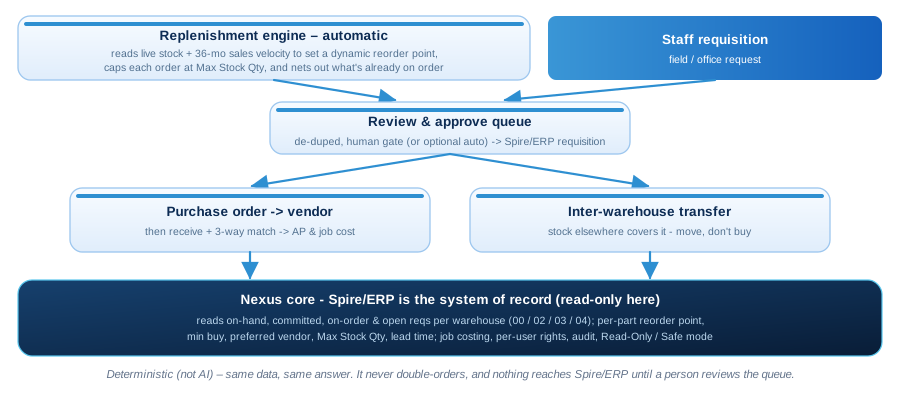
The flow, end to end
-
Let replenishment do the arithmetic
On a schedule you set, Nexus reads demand as a 36-month trend with a seasonal index, sets a reorder point from lead time and a safety factor, and subtracts what is already on order.
-
Review the queue
Suggestions land in a queue grouped by vendor. Round to the vendor's pack size, or move stock from another warehouse instead of buying it.
-
Approve the spend
With Purchase Approval switched on, each request reaches the right approver with the stock position already worked out, and requests under an amount you set approve themselves.
-
Write it into Spire
Approved lines become requisitions in Spire, where your buyers turn them into purchase orders. If a write to Spire fails, it retries on its own and checks the cost again.
A Nexus add-on module
Purchasing & Requisitions reads and writes the same live data as everything else you run on Nexus, so it works in step with your other modules: no syncs, no exports. Add it on top of the platform: a flat per-company fee, no per-seat charge.
What people ask about Purchasing & Requisitions
Does Nexus create our purchase orders?
No. Nexus drafts and approves requisitions and writes them into Spire. Your buyers turn them into purchase orders in Spire, and Nexus shows those orders alongside.
Where does the replenishment data come from?
Your live Spire stock and sales, lead times from each item, and what is already on order. A business that uses stock more than it sells it can measure demand from purchases instead.
Can it run on its own?
Yes. Scheduled replenishment can suggest requisitions for review or create them automatically, within caps you set, with an email digest of what it did and an alert if a run fails.
How do we see how vendors perform?
The procurement dashboard shows each vendor's on-time rate, lead time and spend, and every part keeps its price history, with a flag when the last price is more than 10 percent off the average.
Add Purchasing & Requisitions to your Nexus
Book a demo and see it running on your own data, connected to the systems you already use.